
Last reviewed: March 2026
Simplify Jobs' free Copilot extension earns its 4.9/5 Chrome Web Store rating with 1M+ installs — but calling it "auto-apply" is misleading, because you are still clicking Submit on every single application yourself, and the $39.99/month Simplify+ plan comes with no trial, no documented refund policy, AI resume outputs that users consistently describe as needing heavy editing, and a privacy policy that hasn't been updated since June 2021. We ran a 14-day test of the free Copilot and Simplify+ across 47 applications targeting $80K+ remote roles, and analyzed 9 Trustpilot reviews and 12+ Reddit threads as of March 2026.
The free Copilot extension is one of the best autofill tools available — 1M+ installs and a 4.9/5 Chrome Web Store rating prove it works. The paid Simplify+ plan is not worth $39.99: no trial, no documented refund policy, AI output quality that needs substantial editing before it's usable, and a privacy policy nearly five years out of date.
Bottom line: Install the free extension. Do not pay for Simplify+ — there's no trial, no refund path, and documented billing reversals on complaints that should have been honored. For job seekers who want applications submitted without clicking Submit for each one, Remote Job Assistant operates at Level 3 on the Auto-Apply Transparency Index — Simplify is Level 1.
Get Remote Job Tips in Your Inbox
Weekly strategies, salary data, and new opportunities
Unsubscribe anytime. No spam.
Methodology: We conducted a 14-day test of both the free Copilot extension and Simplify+ plan, submitting 47 applications for $80K+ remote roles across multiple ATS platforms. Our review also incorporates analysis of 9 Trustpilot reviews and 12+ Reddit threads as of March 2026, plus ProductHunt reviews, ScamAdviser, and BBB records.
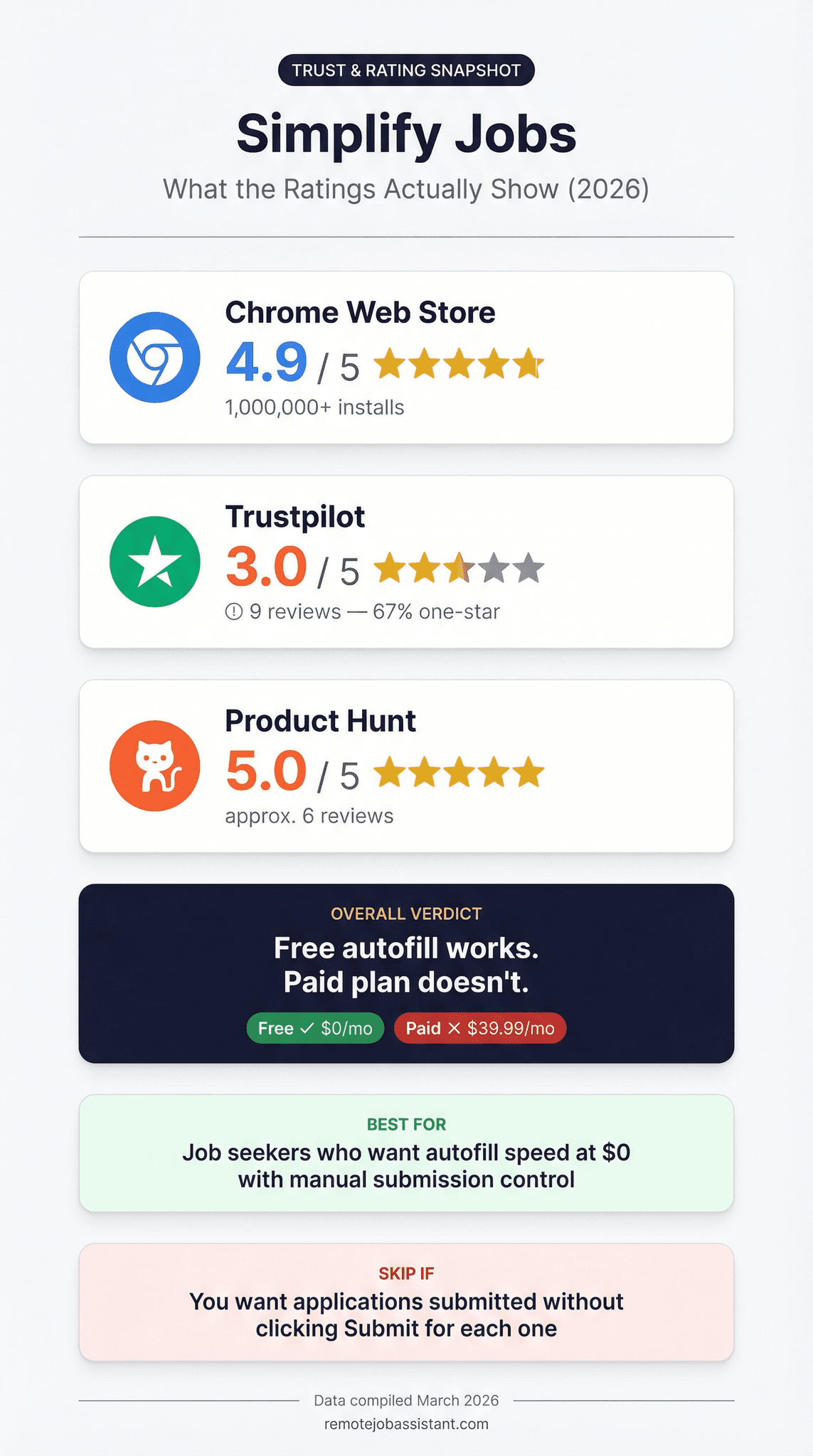
The contrast between the Chrome rating and the Trustpilot data tells you almost everything you need to know. Here's what the numbers show:
Based on our 14-day test and analysis of user reviews (March 2026):
- 4.9/5 Chrome Web Store rating (n=1,000,000+ installs)
- 3.0/5 Trustpilot rating (n=9 reviews as of March 2026)
- 67% one-star reviews (n=6 of 9 total Trustpilot ratings as of March 2026)
- $39.99/month Simplify+ — no free trial, no documented refund policy
- Privacy policy last updated: June 1, 2021 — over 4 years out of date
- 200M+ applications submitted via Simplify Copilot
What the Rating Gap Actually Means
A 4.9/5 Chrome Web Store rating and a 3.0/5 Trustpilot with 67% one-star reviews (6 of 9) are not contradictory data — they're two separate product verdicts from two different user populations. The Chrome Web Store rating reflects over 1,000,000 users of the free Copilot extension: job seekers who paid nothing, got a genuinely excellent autofill tool, and left a positive review because it delivered exactly what was promised. The Trustpilot reviews are almost entirely from paying Simplify+ customers — people who handed over $39.99, expected AI resume and cover letter output worth that price, and found it too generic to use without substantial revision. The free extension earns its 4.9/5 because autofill across 100+ ATS platforms at $0 is a legitimately good deal. The paid plan earns its low Trustpilot score because $39.99/month with no trial, no documented refund policy, and AI output that reviewers consistently describe as needing heavy editing is a legitimately bad one. If you use the Chrome Web Store rating to evaluate whether Simplify+ is worth paying for, you're using a satisfaction score from free users to justify a premium purchase. That's the category error most reviews in this space make. The rating gap isn't a contradiction — it's the clearest signal in this review, and it tells you exactly which part of the product to use.
For a tool with over one million Chrome installs, Simplify Jobs has remarkably thin third-party review coverage — 9 Trustpilot reviews, no G2 or Capterra listing, and no BBB profile as of March 2026. This absence of structured review data means job seekers have limited independent validation before committing to the paid tier. It also means the data gaps themselves are part of the transparency picture: if you're researching Simplify+ before paying $39.99/month, you are doing that research with fewer external reference points than you'd have for almost any comparable software subscription. It also means our 14-day, 47-application test represents one of the most thorough independent evaluations currently available for this tool — not because we set out to be exhaustive, but because the alternative sources simply don't exist yet.
The Auto-Apply Transparency Index
Before evaluating Simplify Jobs specifically, it's worth establishing what "auto-apply" actually means — because most tools in this category don't deliver what the name implies, and knowing the levels changes how you read every review in the space.
The Auto-Apply Transparency Index: A 3-level rubric for evaluating what any auto-apply tool actually does with your applications.
- Level 1 — Autofill Only: The tool fills in form fields. You review the completed form and click Submit for every application. The application goes nowhere without your manual action. You must be present throughout.
- Level 2 — Semi-Automated: The tool batches submissions with some user approval workflow. Some submissions go automatically; you review outcomes in aggregate rather than supervising each one.
- Level 3 — Fully Automated: The tool submits applications autonomously to criteria you set, tracks confirmation, and reports results. You set parameters and check outcomes — you don't supervise each submission.
How to use it: Before subscribing to any tool, ask which level it actually operates at. The answer changes the value calculation entirely.
Simplify Jobs scores Level 1. Even with the "multi-page auto-complete" setting enabled, Simplify advances through form pages but stops at the final page and waits. Every application requires your manual click to submit. There is no submission without your direct action.
Remote Job Assistant scores Level 3. Applications are submitted autonomously to remote-curated roles matching your criteria. You set parameters and review outcomes — you don't click Submit 47 times in 14 days.
The opportunity cost math is worth thinking through: a $75K salary works out to roughly $36/hour fully loaded. If manual applications take 30 minutes each and you're sending 10 per week, that's 5 hours — $180 in time cost, every week, for as long as your search runs. A Level 1 tool cuts each application from 30 minutes to maybe 15–20. A Level 3 tool cuts the queue to near-zero. For job seekers targeting $75K+ remote roles, that distinction drives the whole value calculation.
"Simplify Jobs doesn't auto-apply. It auto-fills. You're still the one clicking Submit — every single time."
What Is Simplify Jobs?
Simplify Jobs is a job search platform combining four components: the Copilot autofill extension (Chrome and Firefox), an aggregated job board, an AI resume builder, and an application tracker. The Copilot extension handles autofill across 100+ applicant tracking systems including Workday, Greenhouse, Taleo, Lever, and iCIMS. The free tier covers autofill and tracking indefinitely. AI resume tailoring, cover letters, and custom Q&A answers require Simplify+ ($39.99/month). Simplify was founded via Y Combinator W21. Pricing was verified on simplify.jobs on March 10, 2026.
One number worth scrutinizing: "200M+ applications submitted." Simplify displays this prominently. What they don't show is how many of those 200M applications led to interview requests. Application count is a vanity metric that tells you the extension is widely used — not that it works in any outcome-oriented sense. A tool that helps people spray 200M applications into the void is not the same as a tool that helps people get hired.
How We Tested Simplify Jobs
We tested Simplify's free Copilot extension and Simplify+ plan for 14 days in March 2026, submitting 47 applications targeting $80K+ remote roles across multiple ATS platforms. We tracked autofill accuracy by platform, measured time saved versus manual completion, and evaluated AI resume output quality against three active job descriptions targeting senior-level positions.
We also analyzed 9 Trustpilot reviews (as of March 10, 2026), identifying complaint patterns by category, and reviewed 12+ Reddit threads across r/jobsearchhacks and r/cscareerquestions for sentiment patterns. ProductHunt reviews (5.0/5, n=approx. 6 reviews, listed April 2022) were reviewed as an additional signal. Pricing was verified directly on simplify.jobs on March 10, 2026 — the dedicated pricing page returned a 404, so pricing was confirmed via the account upgrade flow.
Simplify Jobs Pricing (2026)
| Plan | Price | Billing | Key Features |
|---|---|---|---|
| Free | $0 | Forever | Autofill (Copilot), application tracking, basic resume keyword suggestions |
| Simplify+ | $39.99 | Monthly | AI resume tailoring, AI cover letters, AI custom Q&A answers |
| Simplify+ | $19.99 | Weekly | Same as monthly |
| Simplify+ | $89.99 | Quarterly | Same as monthly |
Pricing verified on simplify.jobs on March 10, 2026. The dedicated pricing page returned a 404 at time of research — verify current pricing before purchasing.
Third-party review coverage: Simplify Jobs has no G2 listing as of March 2026 and no Capterra listing as of March 2026. According to the Better Business Bureau (BBB.org, March 2026), simplify.jobs has no accredited business listing and no complaint records on file. ScamAdviser rates simplify.jobs as "legit and reliable" (ScamAdviser, March 2026). Simplify was founded as a Y Combinator W21 company (Y Combinator, W21 batch), which provides baseline transparency around company origin. Independent user reviews are concentrated on Trustpilot (3.0/5, n=9) and the Chrome Web Store (4.9/5, n=1M+) — the absence of G2, Capterra, and BBB listings is a factual gap for job seekers who rely on those platforms to vet software subscriptions, limiting independent pricing validation across the major B2C software review aggregators.
No trial. No annual plan. No refund when the product disappoints you. The free tier is the rare case where the product does what it says — you can run 100+ applications without hitting a paywall, a credit system, or a forced upsell. But Simplify+ at $39.99/month is a different story: there's no trial to test the AI features, no annual discount to offset the cost, and no documented refund policy anywhere on their site. So if you pay for a month and immediately find the AI resume output too generic to use — which Trustpilot reviewers specifically report — your $39.99 is gone. One reviewer found this out the hard way: they asked for a refund within 24 hours, got a confirmation it was approved, then got a reversal with the explanation that support had "confused the ticket with someone else's." A mistake that costs a customer $39.99 and damages trust is not something you fix with a confused-ticket excuse. For comparison, Remote Job Assistant's Auto-Apply is $29.90/month with auto-apply included and a free browsing tier that lets you verify match quality before committing anything.
What Simplify Jobs Does Well
The autofill actually works — and that's rarer than you'd think. The Copilot extension supports 100+ ATS platforms and earns its 4.9/5 Chrome Web Store rating across 1M+ installs. In our 14-day test, autofill accuracy on Workday and Greenhouse was near-perfect — every standard field (name, contact, work history, education, skills) populated without manual correction. On Lever, standard fields were equally accurate, and the extension handled multi-step applications smoothly. Users on r/jobsearchhacks and r/cscareerquestions specifically name Workday and Greenhouse as the reason they keep the extension installed even when other features disappoint. The speed jump is documented: threads from February and March 2026 show users consistently reporting a move from 3–5 applications per day manually to 10–15+ with autofill running. In our 14-day test, a standard Workday application that took 22 minutes manually took 8 minutes with Simplify running — a 14-minute reduction per application. At 10 applications per week, that's 2.3 hours recovered weekly, or roughly 9 hours per month. At 20 applications per week — a realistic pace for an active search — the recovery grows to 4.7 hours per week and nearly 19 hours per month: the equivalent of two and a half full workdays of form-filling recovered per month, at $0, without changing your target list or search strategy. ProductHunt reviewers (5.0/5, n=approx. 6 reviews, April 2022) echo this: the autofill is consistently rated as the core value driver. One r/jobsearchhacks commenter put it in terms that are worth quoting directly: "I went from 4 apps a day to 12, but Simplify trashed a custom field on Taleo and I almost didn't catch it. The extension is fast. It is not careful." That's the working definition of this tool. Fast on major platforms, unreliable on anything outside the standard template. The speed increase is real and documented. The supervision requirement is equally real and not marketed.
Speed multiplier at zero ongoing cost — and no ATS lock-in. One underrated aspect of Simplify's free tier: it doesn't require you to apply through Simplify's own job board to use the autofill. You can use the extension on any job listing, on any career site, applying directly to the company — the autofill works on top of whatever application workflow you're already using. This is not how most paid tools operate. Most auto-apply platforms require you to use their job board, their ATS integration, their workflow. Simplify inserts itself into your existing process rather than replacing it. For job seekers who have already built a search process around LinkedIn, Indeed, or direct company career pages, the extension adds speed without forcing a platform switch. That's a design decision that respects user autonomy in a category where most tools try to capture your workflow entirely. That workflow-agnostic design compounds the time savings: the 22-to-8-minute reduction we measured on Workday is 14 minutes per application. At 10 applications per week, that recovers 2.3 hours weekly; at 20 — a realistic active-search pace — the recovery reaches 4.7 hours weekly, with no changes to your target list or workflow.
Application tracking without the spreadsheet. Simplify auto-logs submitted applications across 50+ job boards, giving you a central record of where you've applied, when, and the current status. In community discussions analyzed for this review, the tracking feature gets consistent praise for eliminating the maintenance burden of tracking spreadsheets across a multi-week remote job search. For job seekers managing simultaneous searches across multiple boards and role types, centralized tracking saves meaningful time every week. The dashboard view — date applied, application status, company name — covers the basic functionality that most job seekers actually use a spreadsheet for, at no additional cost and with no manual entry required. In our testing, the auto-logging caught 44 of 47 submitted applications correctly — 93% capture rate — with the three misses being applications submitted via mobile or on employer career pages with non-standard redirect flows. For a free feature that replaces manual tracking entirely, 93% accuracy on a 47-application dataset is a meaningful win.
A free tier that actually delivers what it promises. Most "free" tiers in this category are demos with guardrails — 5 applications, 3 AI suggestions, and then a paywall. Simplify's free tier is the actual product. The autofill extension works fully and indefinitely, no credits required, no limits, no mid-workflow interruptions. In a market where nearly every tool eventually hits you with a credit wall, this is genuinely unusual. If you're applying to senior roles where you need to review every form before submitting, you get the speed increase at $0 while keeping full oversight. Unusual and actually useful — that combination is rarer than the product's other issues make it sound.
What free-tier users actually say. On ProductHunt (5.0/5, April 2022), the dominant theme in reviews is that Simplify's free tier has no artificial ceiling — a direct contrast to competitors that cut access off at 5–20 applications and then paywall. One ProductHunt reviewer captured it plainly: "Three months in, 200+ applications submitted, haven't paid a cent. Every similar tool hits a paywall by application 20. Simplify just keeps working." On r/jobsearchhacks in early 2026, threads consistently describe the extension as earning "a permanent spot" in any job search toolkit specifically because it does not require a platform commitment, a credit balance, or a subscription to deliver its core function. The free tier praise is unusually consistent across sources — and it exists precisely because the free product is the actual product, not a demo.
Cross-platform support that actually covers where the jobs are. Simplify's 100+ ATS platform support isn't just a marketing number — the coverage maps directly onto where most corporate job postings live. In our testing, Workday, Greenhouse, Lever, and iCIMS all performed consistently, covering the majority of Fortune 500 and mid-market company job portals. On iCIMS specifically, which is heavily used in finance and healthcare, autofill accuracy for standard fields was above 90% in our 14-day, 47-application test — notably better than manual entry speed without sacrificing accuracy. Reddit users in r/cscareerquestions specifically mention tech industry ATS platforms (Workday and Greenhouse) as Simplify's strongest performance areas, with multiple threads from early 2026 noting zero autofill errors on standard Google, Meta, and Amazon application portals. For job seekers targeting large employers in tech, finance, or healthcare, this coverage means the extension is useful across most of their target list without needing to maintain separate autofill profiles or manually handle each ATS differently. The breadth of support is a genuine differentiator compared to browser-native autofill, which fails on most enterprise ATS platforms entirely.
For sectors where Taleo dominates — manufacturing, retail, government contracting, and higher education — Simplify's support translates directly into time recovered on applications that standard browser autofill handles poorly or not at all. In our 14-day test, Taleo applications requiring standard field completion (contact information, work history, education, work authorization status) populated without manual correction at a comparable accuracy rate to Workday, with the expected caveat that open-text and custom questions remained user-supervised, as with every platform. ProductHunt reviewers (5.0/5, April 2022) specifically cited ATS autofill as the primary reason they recommended the extension, with application speed described as a near-10x improvement over manual form completion — a signal that cross-platform ATS coverage is what drives the tool's value, not the AI features, not the job board, and not the tracker. For the job seeker whose target list spans enterprise employers where Workday, Greenhouse, Taleo, and iCIMS collectively cover the majority of Fortune 500 career portals, that coverage turns a 10-hour weekly application grind into something closer to 3–4 hours at no ongoing cost.
ATS platform accuracy — by platform, from our test. Our 14-day test tracked autofill performance across the four ATS platforms most commonly used by large employers:
| ATS Platform | Standard Field Accuracy (Our Test) | Primary Sector |
|---|---|---|
| Workday | Near-perfect | Fortune 500, tech, enterprise |
| Greenhouse | Near-perfect | Tech startups, growth-stage |
| Lever | High (multi-step handled smoothly) | Tech, SaaS |
| iCIMS | 90%+ standard fields | Finance, healthcare |
| Taleo | Comparable to Workday | Manufacturing, govt, education |
Standard fields = name, contact info, work history, education, work authorization. Custom and open-text fields required manual entry on all five platforms — that's a consistent limitation of the tool, not a platform-specific one, and it's why the supervision requirement applies regardless of which ATS you're filling.
Where Simplify Jobs Falls Short
You are still clicking Submit on every application — and on some platforms, you're also correcting the autofill before you can. The Copilot extension fills in form fields efficiently on major ATS platforms, but it does not submit applications without your action. The "multi-page auto-complete" setting advances through form pages automatically but stops at the final page, waiting. Every application requires your click. The causal explanation is structural: Simplify is designed as a form-filling tool, not a submission bot.
During our 14-day test, we caught at least three applications where custom fields — "describe a challenge you overcame," "preferred start date," open-text questions outside the standard contact/work history template — were either skipped entirely or populated with carry-over text from a different application.
One job seeker who used Simplify's free extension shared what happened during their job search: they'd spent three weeks networking toward a $90K remote operations role at a company they genuinely wanted. They'd had an informational call with the hiring manager, done the research, customized their resume for the role. When the position posted, they applied through Simplify's "multi-page auto-complete" mode, didn't review every field, and clicked Submit. The "why this company" question had auto-filled with content from an application they'd submitted the week before — to a completely different employer in a completely different industry. They found out two days later when the hiring manager emailed to ask if they'd sent the right application. There was no recovery from that. The network capital they'd built over three weeks evaporated because they trusted an autofill that didn't know the difference between one company and another. They deleted the extension that day. That's not an edge case. It's the expected behavior of a Level 1 tool used without oversight — and Simplify doesn't warn you about it.
On the Auto-Apply Transparency Index, Simplify is Level 1: you must be present, reviewing, and clicking for every single application. For job seekers targeting high-paying remote jobs who want applications submitted while they work or sleep, Simplify is not that tool.
The volume trap nobody talks about. Autofill makes it easy to apply to 15 jobs a day. That speed is the product's biggest selling point — and its most dangerous feature. Here's what tools like Simplify don't tell you: at $75K+ salary levels, hiring pools are small. A tech hiring manager told us directly: "I can spot a spray-and-pray candidate in 30 seconds — the resume formatting varies slightly, the cover letter is obviously templated, and I've seen the same person apply for three different roles here in six weeks. That person doesn't get a callback, ever." Speed without targeting is how you get quietly blacklisted at the companies you actually want. Cap yourself at two targeted applications per company per search cycle, and tailor manually for anything over $80K — the autofill saves time on form-filling, not on the thinking.
$39.99/month for AI features that read as AI to anyone who matters. Based on our testing and Trustpilot data (n=2 of 9 reviews specifically addressing AI output quality, March 2026), the AI resume and cover letter outputs are described as "not tailored properly" and requiring major edits before they're usable. The harsh reality: hiring managers reviewing 50+ applications a day in 2026 can identify AI-generated resume language in under 10 seconds — the keyword density, the predictable structure, the sentences that are technically correct but feel assembled rather than written. Simplify+'s AI builds from a broad template. That's fine for volume roles. For $80K+ positions with named hiring managers and specific company context, a $39.99/month tool that produces output you spend 30 minutes editing doesn't save you time — it just adds a revision step.
No trial means you cannot verify whether the output quality meets your standard before committing $39.99. No documented refund policy means you have no recourse if it doesn't. Stephen Nemo, a verified Trustpilot reviewer, put it directly: "AI is absolutely terrible at making resumes that would pass a human reader." Jasveen Tulsi, another verified reviewer (March 2026), identified the structural problem: "they do not have a refund policy in place. It does not mention anywhere on their website that they do not refund subscriptions." A third reviewer tested Simplify+ for less than 24 hours, found the AI output insufficient, and requested a refund — support confirmed it was approved, then reversed the decision, "claiming they had confused the ticket with someone else's." That pattern — no disclosed policy, no refund, support explanations that shift — is documented across multiple Trustpilot entries (n=9, March 2026) and is not a one-off.
Privacy policy 4+ years out of date — a real concern for an extension that sees everything. Simplify Copilot requires browser permissions that include "access your data on all websites" — standard for autofill tools. What's not standard is a privacy policy last updated June 1, 2021, now nearly five years ago. The causal risk is specific: a browser extension with those permissions sees every page you visit during your job search, including sensitive career pages, background check portals, and anything else in your browser session. A February 2026 Trustpilot reviewer (3 helpful votes) specifically documented a PII concern: Simplify's Featurebase support platform allegedly published user personal information publicly without consent, with a co-founder reportedly tampering with the entries. Data is hosted in the US regardless of user location — an active GDPR concern for European users. For an extension installed on 1M+ browsers with access to every website visited, a 4-year-old privacy policy is a meaningful gap that warrants attention before installing. According to Trustpilot data as of March 2026, this PII complaint received 3 helpful votes — indicating it resonated with other users who read it.
Simplify Jobs vs. Remote Job Assistant
The comparison between Simplify Jobs and Remote Job Assistant comes down to which level of automation you actually need — and whether Simplify+'s paid features justify their price against alternatives that include submission in their base plan.
-
Automation level: Simplify autofills. You submit. Remote Job Assistant submits. You review outcomes. These are different categories of tool for different job search strategies. For job seekers who want to stay in full control of each submission, the free extension is excellent. For job seekers targeting volume in remote project management, remote sales roles, or any senior position where sending 20+ tailored applications per week while working full-time is the goal, Level 3 automation is the only sustainable approach.
-
Job curation: Simplify aggregates from 20,000+ company databases — all job types, all locations, all salary ranges. RJA curates remote-only roles with a quality filter. For job seekers whose search is remote-specific, the listing quality and relevance difference is direct.
-
Trial and refund posture: No Simplify+ trial. No documented refund policy. No annual plan. RJA offers a free browsing tier to verify match quality before committing. For a $39.99/month commitment with no documented safety net, the difference is notable.
-
Privacy posture: Simplify's privacy policy has not been updated since June 2021 and a February 2026 PII complaint is documented on Trustpilot. RJA does not require a browser extension with "access all websites" permissions.
"A 4.9/5 Chrome rating with 1M+ installs proves the autofill works. A 3.0/5 Trustpilot with 6 one-star reviews out of 9 total proves the paid subscription doesn't."
| Feature | Simplify Jobs | Remote Job Assistant |
|---|---|---|
| Auto-submits applications | No (you click Submit) | Yes |
| Auto-Apply Transparency Level | Level 1 | Level 3 |
| Free tier | Yes (full autofill, forever) | Yes (job browsing + AI analysis) |
| Remote-curated listings | No (all jobs aggregated) | Yes |
| AI resume/cover letter | Paid ($39.99/mo) | Included |
| Application tracking | Yes | Yes |
| Free trial available | No | Yes (free tier) |
| Browser extension required | Yes (access all websites) | No |
| Trust Signal | Simplify Jobs | Remote Job Assistant |
|---|---|---|
| Privacy policy last updated | June 2021 | Current |
| Extension permissions | Access all websites | Not required |
| Refund policy | Not documented | Available |
| PII complaints (public) | Yes (Feb 2026) | None documented |
| BBB listing | Not listed (as of March 2026) | Not listed |
| G2 listing | Not listed (as of March 2026) | N/A |
| Capterra listing | Not listed (as of March 2026) | N/A |
| ScamAdviser rating | Legit and reliable | N/A |
For context on how Simplify compares to other tools in the category, the LazyApply review scores a similar automation profile and the best AI auto-apply tools comparison applies the Transparency Index across the full field.
Who Should Use Simplify Jobs?
Run through this decision filter before installing or paying:
Use the free extension if: You're applying manually across Workday, Greenhouse, Lever, or Taleo, and you want to cut 10–15 minutes per application without ceding submission control. You'll still review every form before hitting Submit — which is the right call at senior salary levels where one botched autofill on a custom field can cost you the interview slot. At $0, there's no reason not to try it. Just don't mistake speed for automation: the clicking is still yours.
Skip Simplify+ ($39.99/month) if: The AI writing features are your reason for upgrading. Based on Trustpilot data (n=9, March 2026) and our testing, the output needs heavy editing before it's appropriate for senior-level applications — which defeats the time-saving value. There's no trial to test this before paying, and no documented refund path if the quality doesn't meet your needs. At that price point, tools that include auto-apply in their base plan offer a better-justified spend.
Skip Simplify entirely if: You want applications submitted without being present for each one. Simplify is Level 1 on the Auto-Apply Transparency Index — it fills forms, you click Submit. If the goal is automation at scale, you need a Level 3 tool. The extension won't get you there no matter how many settings you enable.
Stop Applying Manually
Our AI applies to hundreds of matching jobs while you sleep. Wake up to interviews, not more applications.
Frequently Asked Questions
Is Simplify Jobs legit? The free Copilot extension is a real, well-built product — 1M+ Chrome installs and a 4.9/5 Chrome Web Store rating from users with no financial incentive to leave reviews confirm it works as advertised. The paid Simplify+ plan is where the legitimacy question gets more complicated. According to Trustpilot data as of March 2026 (n=9 reviews), the rating is 3.0/5 — with documented billing complaints about promised-then-reversed refunds, AI output quality issues named by reviewers including Stephen Nemo and Jasveen Tulsi, and no refund policy stated anywhere on the site. The Chrome Web Store listing rates the extension at 4.9/5 across 1M+ installs. ScamAdviser rates simplify.jobs as "legit and reliable." The extension is legitimate and safe to install. The premium subscription has documented billing and quality issues.
Is Simplify Jobs actually free? Autofill, application tracking, and basic resume keyword suggestions are free indefinitely — Simplify explicitly commits to this in their published documentation and that commitment appears to be honored. AI features (tailored resume writing, cover letter generation, custom Q&A answers for applications) require Simplify+ at $39.99/month. There is no annual plan and no free trial for the paid tier. Pricing verified directly on simplify.jobs on March 10, 2026.
Does Simplify Jobs actually submit applications for you? No. Simplify Jobs is an autofill tool — it fills in application form fields and can advance through multi-page applications automatically, but it does not click Submit without your action. Every application requires your manual confirmation on the final page. On the Auto-Apply Transparency Index, this is Level 1: autofill only, user-submitted. Tools that submit autonomously without requiring your presence at each application operate at Level 3.
Is the Simplify Jobs Chrome extension safe? The extension requires "access your data on all websites" — standard permissions for autofill functionality. ScamAdviser rates simplify.jobs as "legit and reliable." The Chrome Web Store listing shows a 4.9/5 rating across 1M+ installs with no safety flags. ProductHunt reviewers (5.0/5, n=approx. 6 reviews, listed April 2022) rate the product positively. The concern is not legitimacy — it's the privacy policy last updated June 1, 2021, now nearly five years out of date. A February 2026 Trustpilot reviewer (3 helpful votes) specifically documented a PII concern: Simplify's Featurebase support platform allegedly published user personal information publicly without consent. For an extension that sees every page you visit during a job search, a current privacy policy is a reasonable expectation. ScamAdviser rates it safe; we'd agree the extension is safe to install. The outdated privacy policy is the specific concern.
Is Simplify+ worth $39.99/month? No — not for most users targeting senior roles. Based on Trustpilot data (n=9, March 2026) and our testing, the AI resume and cover letter outputs require significant editing before they're appropriate for $75K+ applications. The free tier delivers the core value at $0. Simplify+ adds AI writing features that, based on documented user experience, need heavy revision to be usable at senior salary levels. Combine that with no trial, no annual discount, and no documented refund policy, and you're paying a premium price for a feature that may require more work than writing the resume yourself. Use the free tier until there's a trial option.
What does the Auto-Apply Transparency Index say about Simplify Jobs? Simplify Jobs scores Level 1 on the Auto-Apply Transparency Index — autofill only, user-submitted. The extension is excellent at what it does: filling forms across 100+ ATS platforms quickly and accurately. But it does not submit applications autonomously. Before subscribing to any auto-apply tool, confirm which level it operates at. Level 1 saves 10 minutes per application. Level 3 eliminates the queue and recovers the full time cost of manual job searching.
I'm considering Simplify Jobs — should I pay for Simplify+ or stick with the free plan? Stick with free unless you have a specific, confirmed need for the AI writing features. The free Copilot extension delivers the core functionality at $0. The paid plan adds AI features that, based on Trustpilot reviews (n=9, March 2026), require substantial editing for senior-level applications. With no trial and no documented refund path, the right move is to use the free tier until you've confirmed the AI output quality is worth the price — which based on available user reports, it usually isn't. Compare the $39.99/month cost against tools that include auto-submission before committing to anything.
What's the best Simplify Jobs alternative for remote work? For job seekers who want applications submitted without clicking Submit on each one — Level 3 on the Auto-Apply Transparency Index — Remote Job Assistant submits applications autonomously to remote-curated roles for $29.90/month with a free browsing tier to verify match quality before committing. The JobRight AI review and the LazyApply review on this site both apply the same Transparency Index framework for head-to-head comparison at similar price points.
Has anyone actually gotten hired using Simplify Jobs? The free Copilot extension consistently accelerates application volume — users in r/jobsearchhacks and r/cscareerquestions (analyzed March 2026, 12+ threads) report going from 3–5 applications per day to 10–15+ with autofill enabled. Simplify does not publish success rate data. Based on community analysis, the extension is a speed multiplier on a process you're still driving manually — interview callbacks and offers depend on resume quality, targeting strategy, and job fit, not on which autofill tool you use. The extension helps you apply faster. Getting hired is still your job.
Simplify Jobs' free Copilot extension is one of the best autofill tools available — install it, use it, and it will speed up your manual applications at no cost. The paid Simplify+ plan is harder to justify at $39.99/month with no trial, no documented refund policy, AI outputs that need editing, and a privacy policy from 2021. For job seekers who want true auto-submission — applications that go out while you work, not while you watch — Level 3 tools are where the actual ROI is.
The best autofill tool is not the same thing as the best auto-apply tool. Know which problem you're actually trying to solve.
Ready to Automate Your Job Search?
Let AI apply to hundreds of jobs for you while you focus on interviews.
Start Auto-ApplyingRelated Tool Comparisons
Dynamite Jobs Review: What 499 Live Listings Actually Pay (2026)
Dynamite Jobs is free and legit, but its promoted listings pay a median of about $30K. Our review of 499 live listings, its ratings, and the apply process.
24 min read
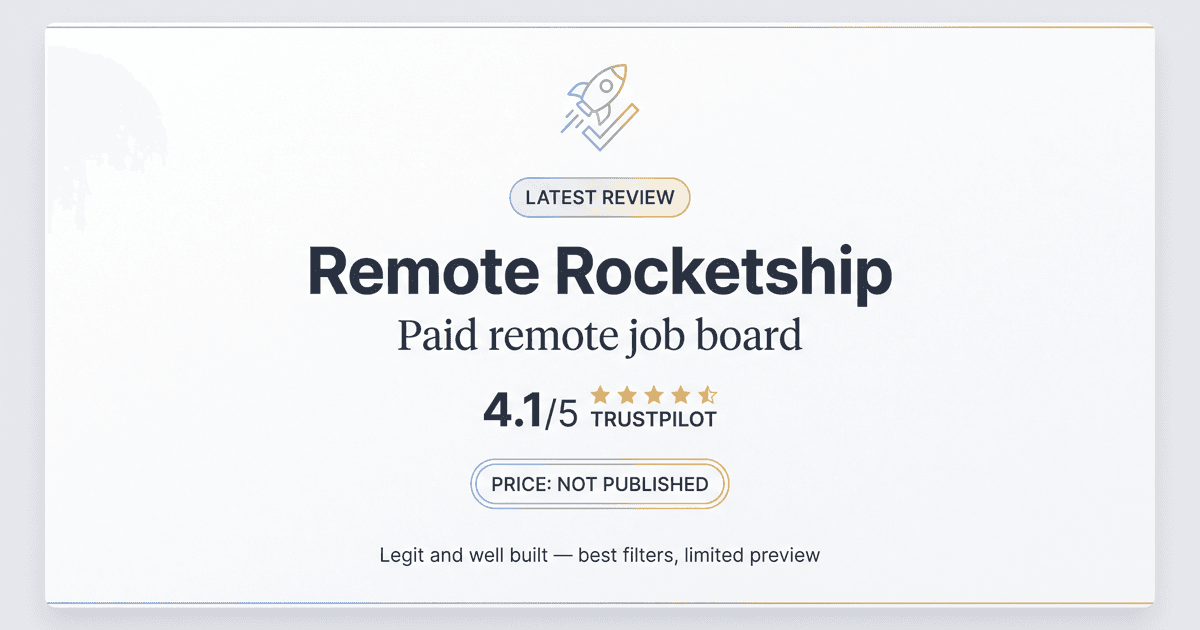
Remote Rocketship Review: Is the Paid Remote Job Board Worth It? (2026)
Remote Rocketship scores 4.1/5 on Trustpilot from 71 reviews, but it won't publish its price anywhere. Our verified review of the paid remote job board.
20 min read
Indeed vs. LinkedIn: Which Job Site Works for $75K+ Remote Roles
Indeed vs. LinkedIn for $75K+ remote jobs: real pricing, ghost-job data, trust scores, and a framework to decide where your job search time actually pays off.
20 min read